Check the start and the end
Play the video near the beginning and write down how far a line is off: for example, the words are spoken at 0:41 but the subtitle appears at 0:43. Then do the same for a line near the end.
- Both lines are off by about the same amount — the file has a constant delay. Shift it.
- The first line is right (or nearly), and the last line is far off — the file drifts. It was timed for a video with a different speed.
- The lines are right, then suddenly wrong after one scene — the video has a cut or an extra scene. Shift only the part after that point.
Late or early by the same amount: shift the file
This is the most common case. The video has a different intro, or a few seconds were trimmed from the start. Shift subtitles moves every line by the amount you enter: use a negative value when subtitles are late, a positive value when they are early.
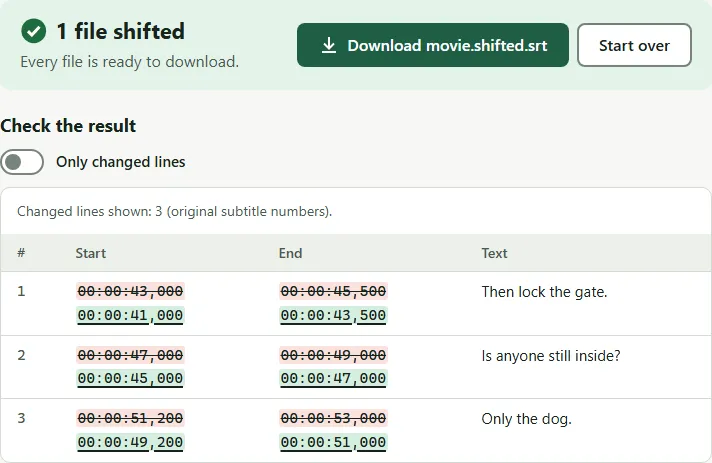
With a shift of −2 seconds, this line:
1
00:00:43,000 --> 00:00:45,500
Then lock the gate.
becomes:
1
00:00:41,000 --> 00:00:43,500
Then lock the gate.
Fine at first, then drifting: change the frame rate
Video is made at several frame rates. Films are usually 23.976 or 24 frames per second; many TV and DVD releases in Europe are 25. When a 23.976 fps film is released at 25 fps, the whole video plays about 4% faster, and subtitles made for the original fall further behind every minute.
Here is what Change subtitle frame rate does to lines at 10, 45 and 90 minutes when you convert from 23.976 to 25 fps:
1
00:10:00,000 --> 00:10:02,000
Ten minutes in.

2
00:45:00,000 --> 00:45:02,000
Forty-five minutes in.

3
01:30:00,000 --> 01:30:02,000
Ninety minutes in.
1
00:09:35,425 --> 00:09:37,343
Ten minutes in.

2
00:43:09,411 --> 00:43:11,329
Forty-five minutes in.

3
01:26:18,821 --> 01:26:20,739
Ninety minutes in.
So the same subtitles are about 25 seconds late after 10 minutes and about 3 minutes 41 seconds late at the 90-minute mark. That growing gap is the sign of a frame rate mismatch. The most common pairs are 23.976 ↔ 25, 24 ↔ 25 and 23.976 ↔ 24.
Drift, and you don’t know the frame rates: sync with two points
If you don’t know which frame rates are involved, or the numbers don’t fit a standard pair, use Sync subtitles. Pick one line near the start and one near the end, and enter the time each one is really spoken. The tool works out the speed change and the offset from those two points and applies them to every line.
You can type the two times from your player, or open your video in the tool’s preview, play it to the moment the line is spoken, and select Use current time for anchor A (then B). The video stays on your computer.
If the speed change it finds matches a standard frame rate ratio, the page tells you, so you can use the frame rate tool next time.
Common mistakes
- Shifting a file that drifts. You can make the start right or the end right, never both. Check the last minutes before you download.
- Shifting in the wrong direction. Late subtitles need a negative shift (they must appear earlier).
- Changing the frame rate in the wrong direction. Source is the rate the subtitles were made for; target is the rate of your video. If the gap gets bigger, swap them.
- Fixing only in the player. VLC and other players can delay subtitles while you watch, but the file stays wrong for every other device. See how to sync subtitles in VLC and fix the file once.
Questions
Can one shift fix subtitles that drift?
No. A shift moves every line by the same amount, so if the delay grows, either the start or the end stays wrong. Change the frame rate if you know both rates, or sync with two points.
Do I need the video to fix the timing?
Not always. You can type times from your player. In Shift subtitles and Sync subtitles you can also open your own video file in the browser to pick the right moments while it plays. The video is not uploaded.
Why do subtitles drift on one copy of a movie and not another?
The two copies run at different speeds. A film released at 25 frames per second plays about 4% faster than the 23.976 fps version, so subtitles made for one copy slowly fall behind on the other.
The subtitles are fine, then suddenly jump out of sync. Why?
The video probably has a scene cut or added, for example a different intro or a deleted scene. Shift only the lines after that point, using the time range option in Shift subtitles.