What CPS and CPL mean
- Characters per line (CPL) is the length of the longest line in a subtitle, counting letters, spaces and punctuation.
- Characters per second (CPS) is all the characters in the subtitle divided by its duration in seconds.
Take this subtitle, on screen for 3 seconds:
1
00:00:01,000 --> 00:00:04,000
When we get to the station, call your mother and tell her.
The line has 58 characters, so it is 58 ÷ 3 ≈ 19.3 characters per second. That is under Netflix’s 20 CPS, but the line is too long: 58 is more than 42 characters, so it must become two lines.
What the guidelines say
| Guideline | Characters per line | Lines | Reading speed |
|---|---|---|---|
| Netflix, English (USA) — adult programs | 42 | 2 | up to 20 CPS |
| Netflix, English (USA) — children’s programs | 42 | 2 | up to 17 CPS |
| Limecraft, vertical video | 25 (hard limit 29) | 3 | — |
Netflix also says a subtitle should stay on one line unless it is longer than 42 characters, and that a two-line subtitle should be bottom-heavy. Lines break best after punctuation and before conjunctions or prepositions, and should not split a name or separate an article from its noun.
For vertical video there is no shared standard yet; the Limecraft numbers are one company’s recommendation, chosen for narrow screens.
Check and fix a file
- Open the subtitle line breaker and add your file.
- Pick a Preset (General, Netflix English or Vertical video) or set your own limits.
- Select Rewrap lines. The report shows a CPS chart and a list of subtitles that are still too fast or too long.
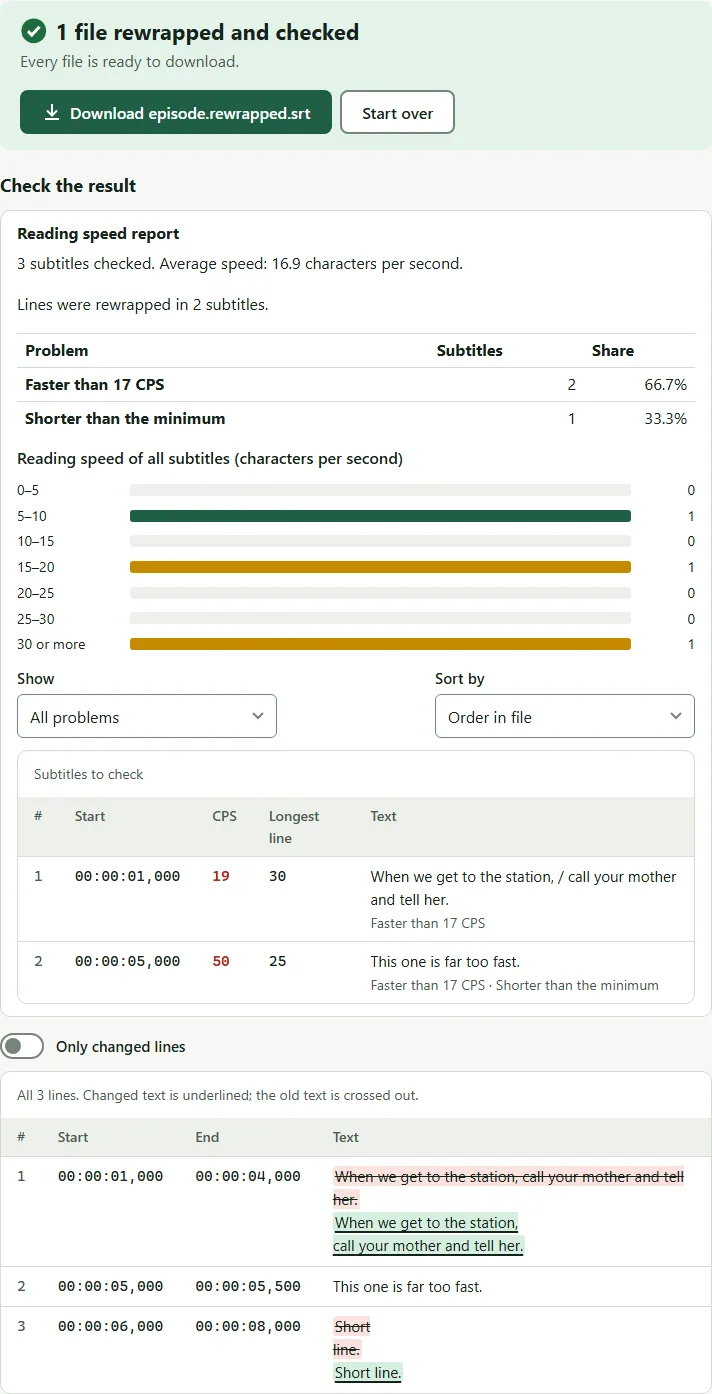
With the default settings (42 characters, two lines), the long subtitle above is split after the comma:
1
00:00:01,000 --> 00:00:04,000
When we get to the station, call your mother and tell her.
1
00:00:01,000 --> 00:00:04,000
When we get to the station,
call your mother and tell her.
Rewrapping does not make a subtitle slower to read; the text and the time stay the same. For subtitles that are still too fast, either give them more time (the line breaker can extend them into a following gap) or shorten the text in a subtitle editor.
Common mistakes
- Counting only one line. CPS uses the whole subtitle, both lines.
- Forgetting sound notes.
[door slams]counts as text. If you are making plain subtitles, clean them before you check the speed. - Extending into the next subtitle. A longer subtitle that overlaps the next one creates a new problem. Fix subtitles finds and repairs overlaps.
Sources: Netflix Partner Help Center, English (USA) Timed Text Style Guide; Limecraft support, subtitling vertical video.
Questions
What is a good reading speed for subtitles?
Netflix allows up to 20 characters per second for adult English programs and 17 for children's programs. Lower is easier to read; many teams aim well below the maximum.
Do spaces count as characters?
Usually yes. Characters per second normally counts letters, spaces and punctuation in the text, but not line breaks or formatting tags. The line breaker lets you leave spaces out if your style guide says so.
How many characters per line for TikTok, Reels or Shorts?
There is no official standard for vertical video. Limecraft recommends at most 25 characters per line and three lines; the line breaker has a Vertical video preset with those numbers.
Can I fix a subtitle that is too fast without editing the text?
Sometimes. If there is a gap after it, the subtitle can stay on screen longer. The line breaker can extend fast subtitles into the free time without overlapping the next one.