What the symptoms mean
Every file stores letters as numbers. A character set (encoding) is the table that says which number is which letter. Plain English letters have the same numbers in almost every table, so English subtitles rarely break. Accented letters, Cyrillic, Greek, Arabic, Hebrew, Chinese and Japanese do not.
| You see | Should be | What happened |
|---|---|---|
café |
café | A UTF-8 file was read as Windows-1252 (Western European) |
Γειά σου |
Γειά σου | A UTF-8 file was read as Windows-1252 |
Ïðèâåò |
Привет | A Windows-1251 (Cyrillic) file was read as Windows-1252 |
caf� |
café | A Windows-1252 file was read as UTF-8 |
caf? or ??????? |
café | The text was saved by a program that could not store the letters; they are gone |
Two letters for each accented letter (é, è) almost always means UTF-8 read the old way. A black diamond with a question mark (�) usually means the reverse: an old character set read as UTF-8.
Check the original file before converting. If the wrong letters or replacement characters were already saved into the text, changing its character set cannot restore them. Use an undamaged copy; saved mojibake such as é needs a separate text repair.
Fix the file: save it as UTF-8
- Open Fix subtitle encoding and add the subtitle files.
- The tool guesses the character set from the text and shows how sure it is, with the first 20 lines.
- Read those lines. If the letters look wrong, pick another Character set; the preview updates at once.
- Download the file. It is saved as UTF-8 with the same lines, times and line breaks.
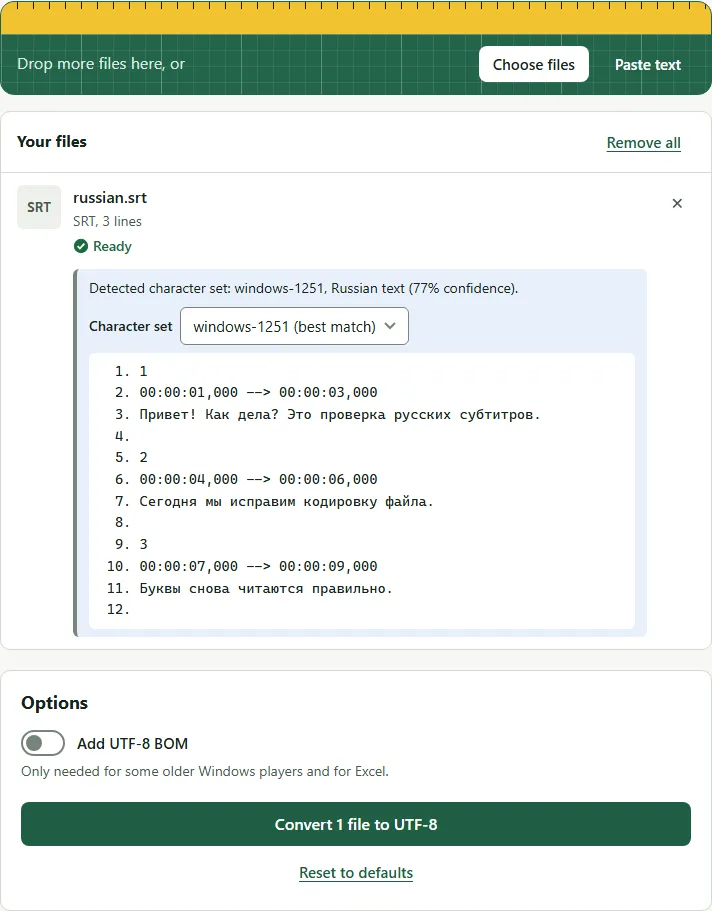
For example, this Russian line saved as Windows-1251 is detected and saved as UTF-8 without changing a single letter:
1
00:00:01,000 --> 00:00:03,000
Привет! Как дела? Это проверка русских субтитров.
1
00:00:01,000 --> 00:00:03,000
Привет! Как дела? Это проверка русских субтитров.
Why the guess can be wrong
The tool can only look at the bytes. A long file with many accented letters is easy to detect. A short file with one or two accented words could belong to several character sets, so the page says when it is unsure and asks you to check the preview. Languages that share letters, such as Central European languages, are the most likely to need a manual pick.
Common mistakes
- Converting a file twice. If a file is already UTF-8 and you force an old character set, you create the é problem yourself. Leave the detected value unless the preview looks wrong.
- Saving again in an old editor. Some text editors save in the system’s character set by default. Save as UTF-8, or download again from the tool.
- Blaming the font. If the preview shows the right letters but the TV shows boxes, the TV’s font may not have those letters. That is a player problem, not an encoding one.
After the letters are right, you can remove hearing-impaired notes or convert the file to another format.
Questions
What is the best encoding for subtitles?
UTF-8. It can store every language, and current players, TVs, YouTube and video editors read it. Older files were often saved in a regional character set such as Windows-1252 or Windows-1251.
Can I fix the characters by changing a player setting?
Sometimes. Some players let you pick the subtitle encoding, but the setting only helps on that device and for that one file type. Converting the original file to UTF-8 helps players that support it; missing font characters need a player or font change.
The letters are question marks in the file itself. Can they be recovered?
No. If the file contains real question marks, the original letters were lost when it was saved. Find another copy of the subtitles.
What is a BOM and do I need one?
A byte order mark is an invisible marker at the start of a file that says it is UTF-8. Most players don't need it. Turn it on only if an older Windows program still shows broken letters.